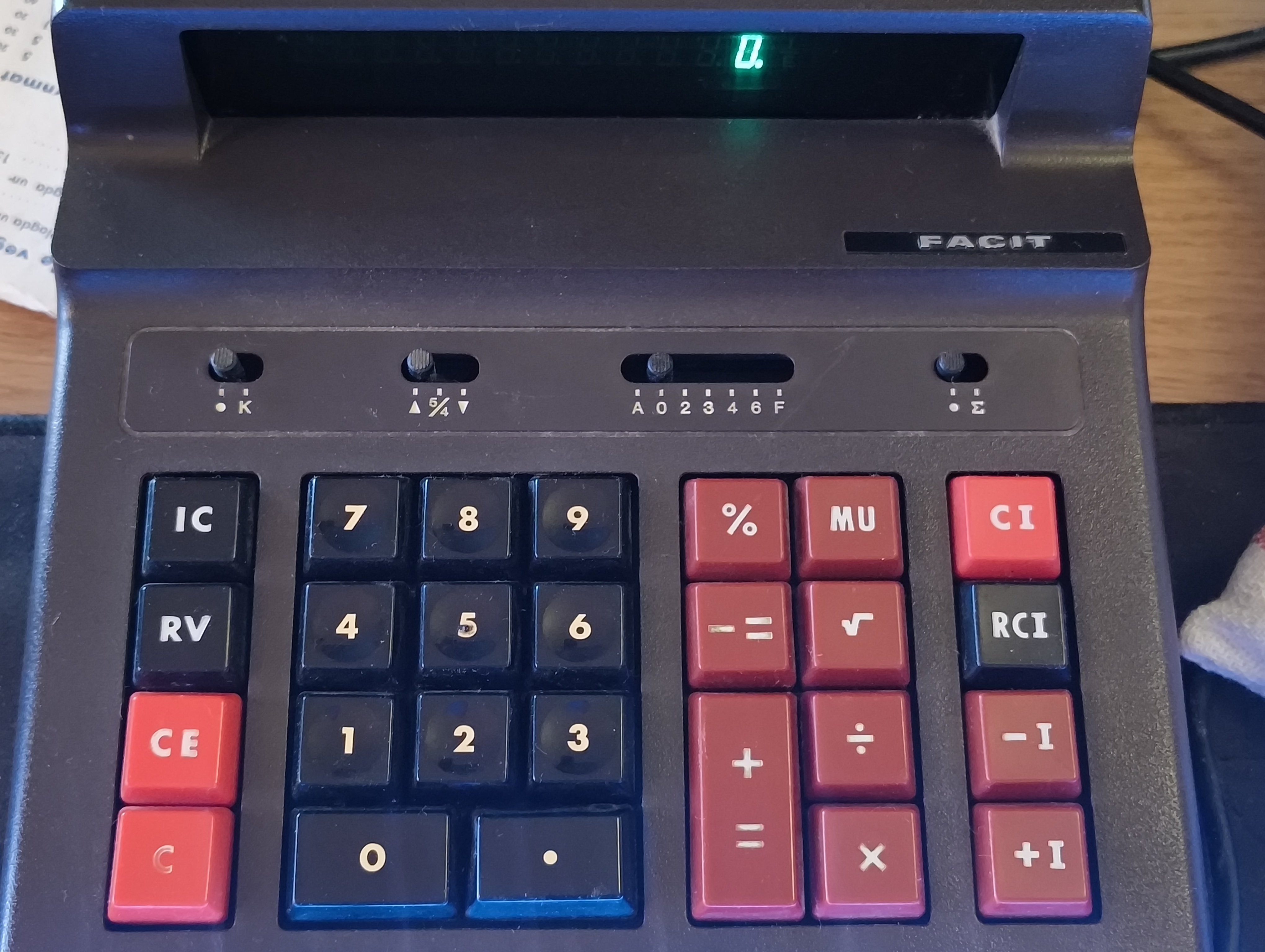
Found some documentation listing the two middle switches as the rounding switch (up fraction down) and the decimal switch (auto? 0 to 6 then hex?). No idea on the other two.
http://www.calcuseum.com/SCRAPBOOK/BONUS/32853/1.htm
Decimal switch: [A-0-2-3-4-6-F], Round switch: [(ArrowUp)-5/4-(ArrowDown)], Miscellaneous switch: [(Blank)-K .-(Sigma)],
Nice!
deleted by creator
Thanks, I already know no. means number
No means no, you misogynist pig!
No
Trying to find the sum of my meme ransom please respond
Now someone explain the right and left columns of buttons
Right! I haven’t even thought about when yet.
All I can tell you is that the right side is somehow related to the rightmost switch. C and CE do what they do on any calculator.
The right-most switch lets you turn on sigma mode.
I would assume that’s summation mode, so everything you enter is treated as a running total. This looks like a business calculator.
That’s pretty sigma
Honestly, some of those calculator switches look way more complicated than they probably need to be! For everyday ratio questions, it helps to have something that simply takes the numbers you know and works out the missing one. A proportion solver does just that for equations like a/b = c/d, and showing the steps makes it much easier to see how the answer was reached.