
Mostly the title. I try to keep my apps inside relevant folders, but this is getting tedious.
I’m wondering if it may be better to keep apps of one kind (e.g., maps/navigation) on their own screen and other apps (e.g., social media) on a separate screen.
Is it easier to swipe by screen or to keep similar apps in folders? What do you think?
Home screen is a bunch of folders, but each folder is just apps with a particular colour of icon. Red folder, green folder, blue folder… Rainbow folder (that’s mostly googly apps plus slack)
Because I don’t easily remember apps by themes but I usually know the colour of the app I’m looking for. Super efficient
I’ve been using μLauncher (github) for probably 6 months or so on my Pixel 8a.
I like it. I like trying a bunch of different apps for different things so I do a lot of Favorites/App management daily. Its also just a nice minimalist launcher. I’ve recently started taking more advantage of all the gesture options to quickly open apps as well from the home screen.
Edit: Forgot to mention μLauncher doesn’t show apps on the home screen. Instead you get the app drawer, a favorites “drawer” and a whole lotta gesture options you use from the home screen.
I use one main page with only the home row of 5 apps, and one other page to hold my calendar and budget widgets. I use the default app tray to open apps instead of scattering them across screens. Pixel 8 Graphene OS.
I’ve got 12 folders on my homescreen, but each of those can be swiped up, down, left or right to launch my most frequently used apps. I do have a second screen, but it’s just used for a couple of calender widgets.

I haven’t used my all apps screen in months. I just use a search based home screen. My home screen is just a clock and weather widget.
I have everything in folders on my home screen, I don’t like swiping

Kvaesitso
One page of favourites, then search-based for other apps.
I stg Kvaetsitso fixed my adhd /hj
Main screen: wallpaper, clock in the center and favorites at the bottom
Go right: search-based grid of all apps
Go down: mini weather ontop, Kvaetsitso notepad widget taking up the entire rest of the screen. The ability to be able to jot quick todos or notes without needing to open an app has been close to life changing for remembering to do things
Thanks!
I’m updating some of my layout now, based on your comment (c:
I find it more practical to seperate by things you uses frequently vs things you use occasionally. Frequently used things get a place on the home page where it’s easy to get to, everything else is dumped into a few broad catagories.
I have 4 folders, “stores(&bank stuff)” “games(&entertainment)” “utilities(&misc)” and “work”.
It’s all sorted alphabetical.
I have three folders in the home screen so it can have Safari and look balanced. For apps not in the folders I use search.

I use Niagara launcher, so all of my apps are in a single scrollable list.
This isn’t a screenshot of my own phone, but this is essentially what it looks like. There’s an A-Z list on the right that you can use to jump to a specific letter, or just scroll down the full list on the left. You can keep a small list of favorites at the top. It does support folders, but I don’t use them.
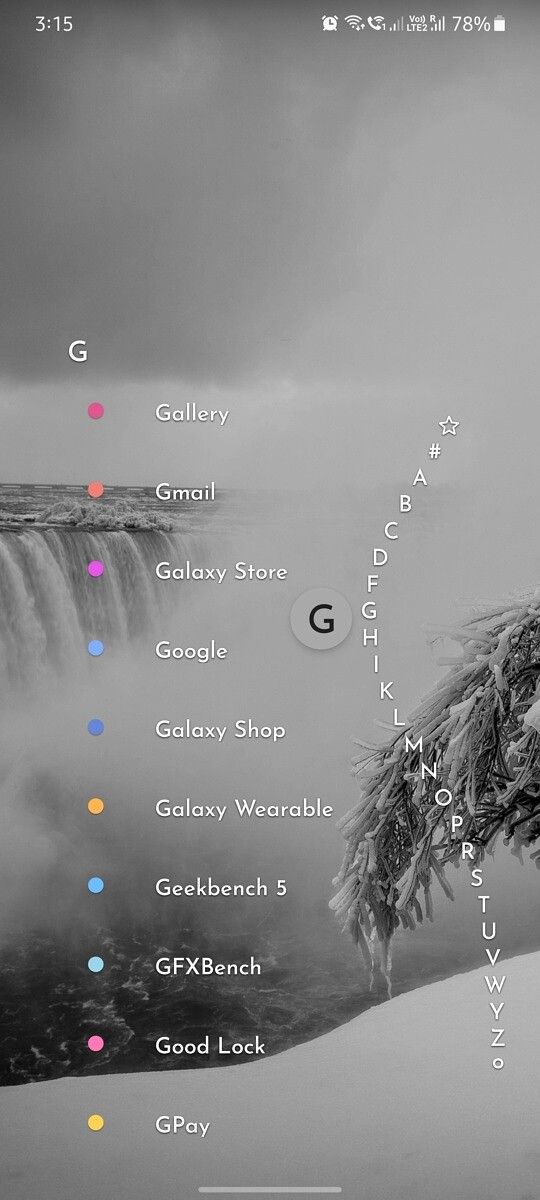
Navigating to any app in Niagara is so fast. It keeps my home screen looking fresh and clean while also keeping every app within a couple seconds reach, no folders necessary. Honestly I feel like folders would just make it take longer.

I only have 2 screens of apps.
First page (Main) is all the apps I use frequently. The most frequently used apps are in places where I can easily reach while one-handed.
Second page is apps that are used rarely. A lot of utilitity apps fall into this category.
One screen of my most frequently used apps, no folders, and spotlight for everything else. It invariably surfaces whatever I’m looking for with just the first letter, so I don’t see the point in cluttering my phone with extra screens and folders.
I only have widgets on my home screen, but only for stuff i deem important enough (Auxio, Breezy Weather & Clock). I have my important apps for which i don’t have an appropriate (and fitting) widget (Signal, Element, Firefox, Obsidian) in my dock organized using folders based on category. In the app drawer i use Lawnchair’s caddy layout, which sorts my apps based on their category. Despite this i mostly just use the search bar for looking for apps.