

You can login to (using my preferences as an example) DDG and configure it to not use AI, but I mostly browse in private/incognito mode and don’t care to login to DDG every time I open a browser. However, I - and you - don’t have to login to enforce that preference; at least with DDG you can set a default search engine that automatically avoids it. Here are the parameters in mobile Firefox:

Even in Chrome and Chrome derivatives, you can set a default search engine; I don’t know the exact steps, but the end result should look similar to the above.
If you prefer to stick with Google, even they offer a no AI solution. I haven’t used Google in years, but according to arstechnica, this would be the equivalent configuration:
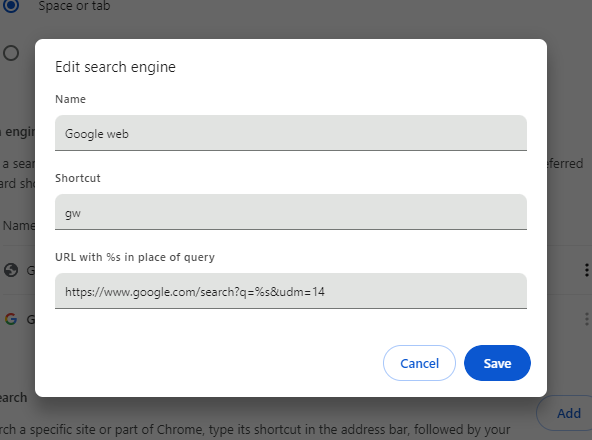
I’ve not used any other search engines since Altavista, so I can’t provide details for each one, but hopefully this is a good starting point.
edit: It seems this changed … Or maybe I had it wrong from the beginning, but I tested this when I posted it, so I think it changed. Regardless, the q= is not necessary currently.
You made me finally check ecosia if there is an ai free feature and there is and it seems to filter out ai images in the image search BLESS
Things like this is exactly how I got hacked for the first time in my life even though I’d say I’m pretty careful as someone who eventually ended up working in Cybersecurity.
When anti-adblocks started being a thing, there was a pretty well recommended alternative, I think something like NanoDefender? Don’t remember the name. Several hundred thousand installs, recommended as a good alternative that’s not blocked as often as AdBlock was. Made it my default adblock.
Two years later, the guy sold the extension to a “company” that immediately pushed a infostealer update.
So, installing random extension if I can avoid it, unless it’s really well known, like Bitwarden or UBlock, is never worth it. Especially if you can easily solve it some other way.
I mean the extension is published by the Duckduckgo team… Also I can get my friends and family click on that, but no way to make them edit some settings.
Ah, in that case it’s probably fine. Didn’t really check it. But yeah, I’d consider that a trusted provider.
You say “just do this,” but installing something seems like more than just editing the configuration to me.


