TCL TVs (whose OS is just Roku, and I imagine Roku is the same situation) blink the front LED as an Error when there’s no network connection or it can’t hit whatever servers it has configured for FW update check. It can get stuck on partial firmware updates when it can’t cokplete every check it wants to make. The LED has a diffuser on it so it’s a significant negative impact.
I can’t even tape that LED because that’s also where the IR sensor is. My next step is to disassemble the thing and snip snip.
I don’t use any smart features, just HDMI input like you. Finding a Dumb TV has been a challenge.
TCL makes Google TV models which explicitly allow you to set them up without Wi-Fi so only HDMI and antenna work. You should buy one of those next time.
After reset i was given the 2 options of home or store.
BTW Store did not have a setting to disable standby LED, so I reset again with Home, and lucky I did because that has slightly more settings, including that one.
You have full control of picture settings, yes. Also picture profiles (Movie, Vivid etc). Full color brightness contrast adjustment. HDR detection.
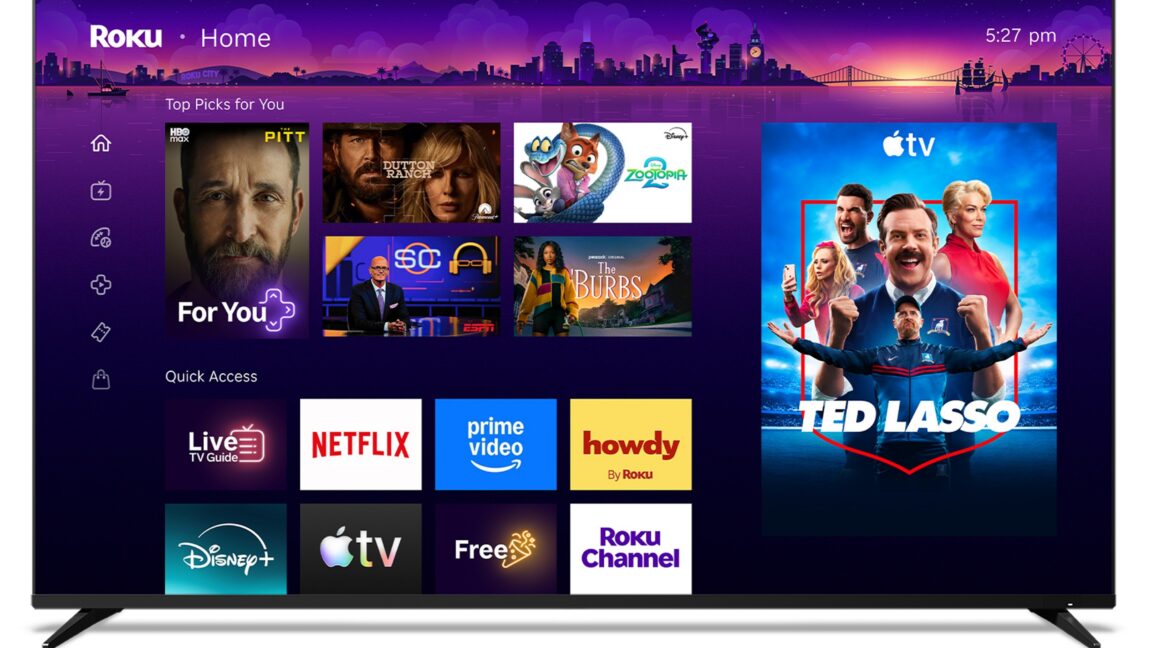
I had no Ethernet connected and never connected to wifi. There is no Roku OS. It’s a TCL OS with fewer settings. I could custom name the inputs and I personally made my HTPC inlut be startup. The main menu does have a static Roku Ad in Home mode. When starting instead on an input, input can be changed with the side drawer flyout menu, so I never have to see that main menu ad (not that it’s intrusive, there’s not really enough menu items to require a full screen anyway).
Nothing is bugging me to connect or do anything, and I couldn’t be happier. Wish I knew about this sooner.
If you haven’t done so yet, you should set the clear motion/action smoothing setting to custom with de-judder and de-blur set to 0, and turn off the noise reduction stuff.
The blur and AI generated look those features cause on their default settings is even worse than home screen ads for me.
Oh good to know. Much appreciated. Thisnines still going strong after 6.5y, great panels honestly. If LED neutering failed I was only going to look for other brands because of this thing so this is super good news
Just did this. Appreciate the tip. I had to select In Store Demo, which made it a Dumb TV. Its perfect.
Edit: store demo isn’t required and has more limited settings. Just resetting and not connecting to anything makes it a dumb TV with no Roku OS on it. Inout selection, picture controls, sound controls, and that’d about it.
Ooh, definitely gonna try this first. I actually assumed that factory reset would use the 1y old firmware that introduced the problem, but it could well roll back to the 6y original.


TCL TVs (whose OS is just Roku, and I imagine Roku is the same situation) blink the front LED as an Error when there’s no network connection or it can’t hit whatever servers it has configured for FW update check. It can get stuck on partial firmware updates when it can’t cokplete every check it wants to make. The LED has a diffuser on it so it’s a significant negative impact.
I can’t even tape that LED because that’s also where the IR sensor is. My next step is to disassemble the thing and snip snip.
I don’t use any smart features, just HDMI input like you. Finding a Dumb TV has been a challenge.
TCL makes Google TV models which explicitly allow you to set them up without Wi-Fi so only HDMI and antenna work. You should buy one of those next time.
I just did a factory reset per another reply and I selected to set up as Store Demo, which makes it a dumb TV :)
How do you do that, and do you get full control of picture settings?
After reset i was given the 2 options of home or store. BTW Store did not have a setting to disable standby LED, so I reset again with Home, and lucky I did because that has slightly more settings, including that one.
You have full control of picture settings, yes. Also picture profiles (Movie, Vivid etc). Full color brightness contrast adjustment. HDR detection.
I had no Ethernet connected and never connected to wifi. There is no Roku OS. It’s a TCL OS with fewer settings. I could custom name the inputs and I personally made my HTPC inlut be startup. The main menu does have a static Roku Ad in Home mode. When starting instead on an input, input can be changed with the side drawer flyout menu, so I never have to see that main menu ad (not that it’s intrusive, there’s not really enough menu items to require a full screen anyway).
Nothing is bugging me to connect or do anything, and I couldn’t be happier. Wish I knew about this sooner.
If you haven’t done so yet, you should set the clear motion/action smoothing setting to custom with de-judder and de-blur set to 0, and turn off the noise reduction stuff.
The blur and AI generated look those features cause on their default settings is even worse than home screen ads for me.
So I have Denoise settings, I will disable per your recc.
But I don’t have motion/blur (I don’t remember having it in the Roku OS either so my 6.5yo TV may just not have had that)
I have a Game Mode that seems to increase response time at the cost of picture quality, which I have disabled.
Oh good to know. Much appreciated. Thisnines still going strong after 6.5y, great panels honestly. If LED neutering failed I was only going to look for other brands because of this thing so this is super good news
I did a factory reset on my TCL roku tv and use a third party streaming box. Blinking red light on the TV went away after the factory reset for me.
Don’t worry, the next model they release probably won’t allow you to do that.
Just did this. Appreciate the tip. I had to select In Store Demo, which made it a Dumb TV. Its perfect.
Edit: store demo isn’t required and has more limited settings. Just resetting and not connecting to anything makes it a dumb TV with no Roku OS on it. Inout selection, picture controls, sound controls, and that’d about it.
Cannot thank you enough. Dumbt TVs for life.
Ooh, definitely gonna try this first. I actually assumed that factory reset would use the 1y old firmware that introduced the problem, but it could well roll back to the 6y original.